


Personal collective of ideas, thoughts and notes
DevOps, and particularly Continuous integration (CI) and continuous delivery (CD), are terms which has been adopted widely and over the past few years in the software development industry. It’s use is currently creeping outside the scope of development and into various departments wanting to decrease long delivery cycles and increase product iteration. For those unfamiliar with the terms in the software space, or premise behind the idea: CI/CD is essentially the automation of the delivery of your software development projects into production and the broader goal is to bring Development and Operations closer together. In this blog we will mainly focus on CD as it pertains to HANA XS development.
Inside SAP IT, and like a lot of other IT departments, we are trying to increase and simplify the deployment of our HANA XS projects and move to a more agile approach in delivering solutions for our internal customers.
Firstly, some background: As many of the XS Developers out there know, the HANA repo is not necessarily the easiest “file system” to work with. The fact that data is stored in the DB, in a propriety format and each file needs to be activated, makes it tough to automate basic operations like moving or copying. In order to work around this topic, we decided that all of our code deployments were going to be done using HANA’s preferred native “packaged” file type known as delivery units (DU). These contain the entire active code base of a project (or subset of a project), changed as well as unchanged files.
In the past we manually deployed code to each of our instances individually, this required manual intervention and developer/operations availability which we hoped we could streamline. The DU import process we decided to use is a feature which was introduced in SPS09 through a command line tool called HDBALM. This allows any PC which has the HANA client installed to import packages and delivery units to a HANA server. While there are options to commit and activate individual files from a traditional file system folder system (using the FILE API), we felt the benefits of a DU were better suited to our use case (for example, hdb* objects which may need to be created in specific order).
Since we have the ability to deploy our code to our various servers using HDBALM, we needed something to get the job done! We used our internal instance of Atlassian Bamboo. We use this server for our HCP HTML5 and Java apps which make it a logical choice to keep our projects grouped to together. Our build agents are redhat distros and have the HANA client installed. We also copy over the SSL cert since our hana servers are using https and these are needed for hdbalm.
In this case, and example, our landscape is relatively simple with a Dev, Test and Production dedicated HANA HCP instances.
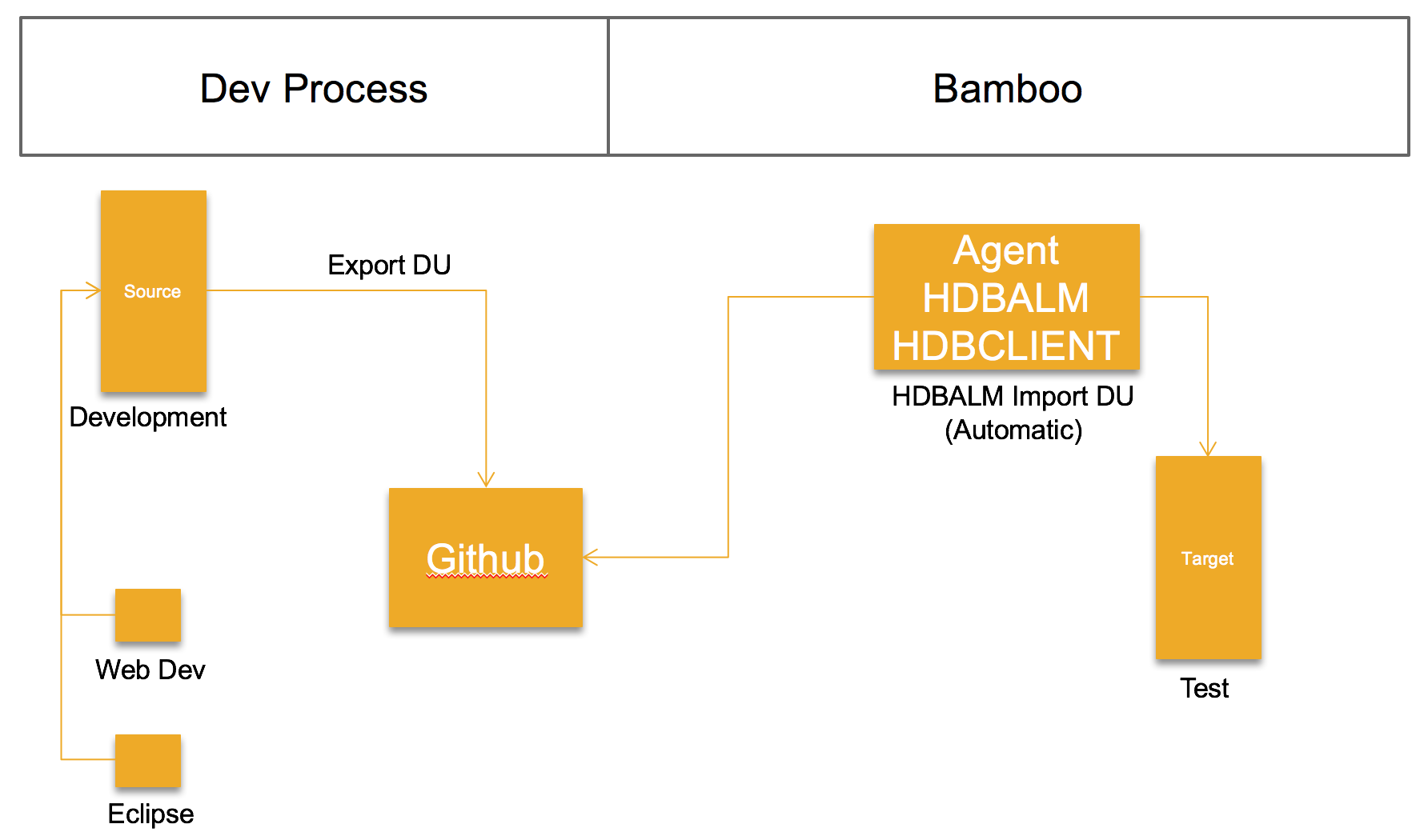
We store our “ready for deployment” delivery unit on our Internal Github instance, we do this so that the file is version controlled and also visible and accessible to our dev team. The premise is that the dev team would push a version of a delivery unit after their sprint, and its ready for deployment to Test. This could easily be a file system as well. However, we like to use the push/tag/release of our Github repo to trigger the build deployment.
FYI: Bamboo is a great tool and a nearly zero cost barrier ($10). If you are considering a build server which has a quick and easy installation (*nix) and setup, I would highly recommend it.
Since we have gone through some of the logical details, here are some technical details covering the topic:
As mentioned previously, our build process is trigged by a new delivery unit being committed to our github repo. Our bamboo build agent picks the build up, saves it on the build server and deploys it to our Test instance. A email is sent to our dev and test team with the results. Before the import process, we check the version identifier on the existing delivery unit which was on the server, and we subsequently check it again after the import for comparisons and decide if the import was successful (along with the results of the import statement)
(Keep in mind the below commands include $bamboo_variables) but would work just fine to replace them with actual values.
You can find the code here in a github gist (where it will be maintained)
export HDBALM_PASSWD="$bamboo_DestXSPassword"
export https_proxy=http://proxy.wdf.sap.corp:8080
echo " "
echo " "
echo " "
preversion="$(/home/i847772/sap/hdbclient/hdbalm -s -y -h $bamboo_DestHostname -p $bamboo_DestHostPort -u $bamboo_DestXSUsername -c $bamboo_DestSSLCert du get $bamboo_DeliveryUnitName $bamboo_DeliveryUnitVendor)"
if [[ $preversion == "" ]]; then
  echo "Initial install of the DU";
  preinstallversion="0.0.0"
else
  preinstallversion=$(echo $preversion | grep -Po '(?<=version:)[^r]+' | xargs)
fi
echo "Pre Install version: $preinstallversion"
IMPORT_LOG="$(/home/i847772/sap/hdbclient/hdbalm -s -y -j -h $bamboo_DestHostname -p $bamboo_DestHostPort -u $bamboo_DestXSUsername -c $bamboo_DestSSLCert import "$bamboo_DeliveryUnitFilename")"
postversion="$(/home/i847772/sap/hdbclient/hdbalm -s -y -h $bamboo_DestHostname -p $bamboo_DestHostPort -u $bamboo_DestXSUsername -c $bamboo_DestSSLCert du get $bamboo_DeliveryUnitName $bamboo_DeliveryUnitVendor)"
if [[ $postversion == "" ]]; then
  echo "Unable to query installed delivery unit version"
  postinstallversion="-1"
else
  postinstallversion=$(echo $postversion | grep -Po '(?<=version:)[^r]+' | xargs)
fi
echo "Post Install version: $postinstallversion"
export HDBALM_PASSWD=""
LOG="${IMPORT_LOG##* }"
if grep -q "Successfully imported delivery units" $LOG && [[ $postinstallversion == $preinstallversion ]]; then
    echo " "
    echo " "
    echo "******************************************************* Import of the DU completed, but the version has not changed  *******************************************************"
    echo " "
    echo "Its possible you have not incremented the version numbers"
    echo " "
    echo "******************************************************* Log File $LOG *******************************************************"
    echo " "
    echo " "

    if [ $LOG != "" ]; then
        cat $LOG
    else
        echo "No log file, ensure the job is running on a machine with HDBALM"
    fi
    echo " "
    echo " "
    echo "******************************************************* //Log File  *****************************************************"
    echo " "
    echo " "
    exit 0

elif [ $postinstallversion == "-1" ]; then
    echo " "
    echo " "
    echo "******************************************************* Import of the DU Has failed  *******************************************************"
    echo " "
    echo "******************************************************* Log File *******************************************************"
    echo " "
    echo " "

    if [ $LOG != "" ]; then
        cat $LOG
    else
        echo "No log file, ensure the job is running on a machine with HDBALM"
    fi
    echo " "
    echo " "
    echo "******************************************************* //Log File  *****************************************************"
    echo " "
    echo " "
    exit 1

else
    echo " "
    echo " "
    echo "******************************************************* Import of the DU has completed successfully  *******************************************************"
    echo " "
    echo "Installation successful"
    echo " "
    echo " "
    exit 0
fi
exit 0
Summary:
Developing HANA applications is a task split evenly between web, database and UI/UX Developers. This article outlines some helpful and useful tools for all 3 of the tasks when companies take on the challenge of HANA web app development.
Upon release of HANA SPS05, SAP introduced a great new feature called HANA Extended Services (Also known as the XS Engine). The concept was to embed a fully featured web server within the SAP HANA appliance. Not only was it a web server, but it also provided development tools and an application server. One core difference between traditional web servers and the XS Engine, is that it has the ability to execute SQL using the exposed core API’s using Server side Javascript (XSJS). Thus making accessing and modifying your database artifacts very simple and straight forward. With the SPS08 release of HANA, the XS Engine has come a long way and with the additional features, improved stability and the core performance increased, giving us an encouraging sign of a mature product.



I was trying to replicate the success of the SAP Note Viewer app over to the Microsoft Community since they have a similar concept to SAP Notes, in the form of KB articles. The app did OK with roughly 6K downloads in its lifetime, but ultimately not nearly as well as the SAP Note Viewer (15K downloads). I believe I should have put a bit more effort and focus on this app at the time, the user base is considerably bigger versus the SAP base, so it had the potential to grow into something considerably more substantial. As enterprise companies recognized the missed opportunity, many of them have started to offer their own support options, and the web has become considerably more responsive, enough to where native apps are not always needed.


You must be logged in to post a comment.