Git HANA – A free, open-source Github client for SAP HANA

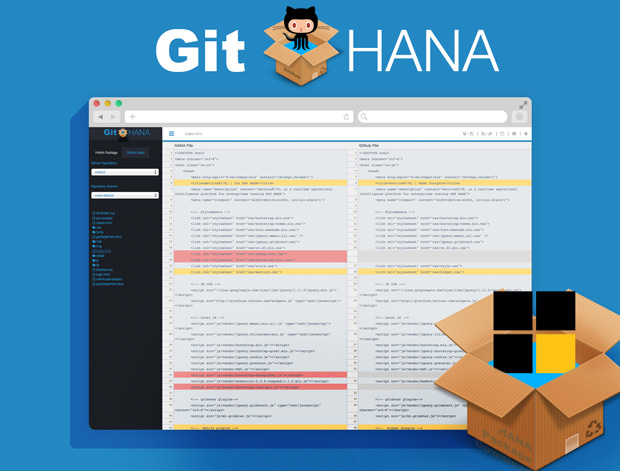
Git-HANA-Screenshot.jpg

Over the last few months, working on the metric² open source project, I have been frequently updating the GitHub repo. As a heavy XS Web IDE user, this entailed exporting or copying the contents of the files from the package into my local GitHub repository for the project and subsequently committing the files from there. Since there is a small disconnect between the source (my HANA packages) and the destination (GitHub) I like to often see what changes which are due to be committed, the differences between the files, or just compare the files between the 2 systems.

Being over dedicated to building solutions to some of my workflow challenges (see herehere and here), I created yet another small HANA native app called Git <> HANA. The application allows you to compare files between your local HANA package and your (or any other) GitHub repo, and it also lets you commit files directly from the UI to GitHub, and vice-versa. If a file does not exists, it will create it for you (on either side). There are a couple other cool features which you can read about below, or watch the little video I created. read more

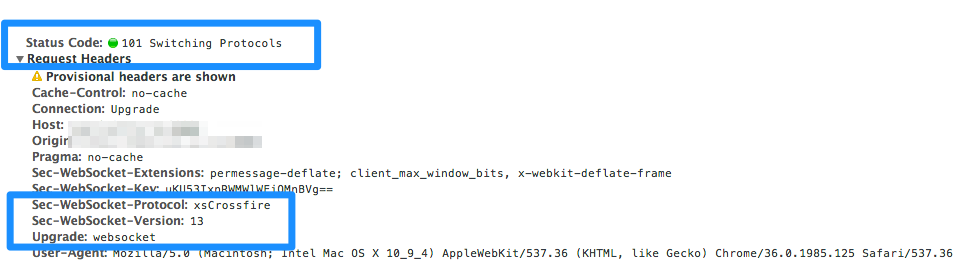
Hacking SAP HANA Websockets

Disclaimer: This is not a production or documented feature – its also more of a hijack than a hack  🙂 

I have been hoping for the inclusion of Websocket support on the HANA DB platform for a while now, and I was a little disappointed it was not packaged in the SPS08 release. My goal when building apps (or products) is to make use of the core platform its running on as much as possible, I firmly believe that when convincing an IT department, or company, to implement a product or app, the first question is: “How much infrastructure does this need?”. This can often be a deal breaker and why I am such a big proponent of the HANA’s DB + XS App Server integration – it consolidates the requirements into a single investment. Having a Websocket technology built directly in XS can be an additional selling point which developers are starting to expect these days. read more

Open Source Project: Metric² for SAP HANA – v2.0

After releasing metric² at TechEd Las Vegas last year it has had well over a hundred downloads, and has a couple loyal followers always offering advice and feedback (which I am truly thankful for). Last week we released version 2.0 of the free and open source app and subsequently put it onto GitHub under the MIT license which you can find here.

The biggest changes of the new version of metric² include:

  • A new UI (Twitter bootstrap based)
  • The ability for users to create their own account
  • A few new metrics
  • No longer uses SAPUI5 (a blog post in itself!)
  • The biggest change was the front-end/UI and the code has been refactored and split up into multiple library files (XSJSLib) and is simplified for easier reading.

The primary goal of the app is, and always has been to try and visualize your big data. Along with providing a self service tool to monitor and provide insights on the data you have in, and around your HANA system, while using it to the fullest.

Short Survey

I am in the process of trying to understand where to take the app in terms of use and direction and if you are interested in helping guide the discussion, if you have downloaded, used or seen the app I would greatly appreciate if you took 1 minute to complete a short 5 question, multiple choice survey here. read more

2014 Big Data Hackathon – Charlotte

A local tech company – Tresata recently sponsored a 24 hour hackathon in Charlotte around big data in the retail space. It was a ton of fun. I think I was the only person who brought along their own monitor, but I was quite prepared 🙂

My experience with statistical analysis, python and Jupyter was quite limited, so I decided to focus my attention on building a mobile focused use case with some big data integration and I ended up winning the innovation award. A pretty cool pair of Google Glasses 🙂

Open Source Project: XSOData Service Browser

Introduction

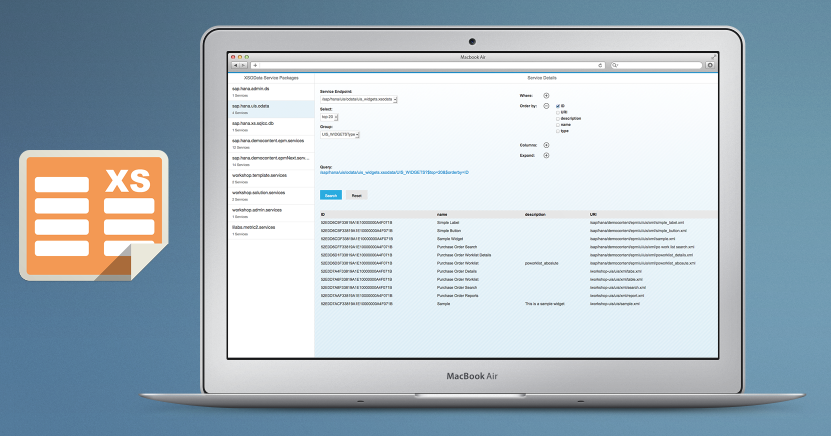
I was recently working on developing a couple of XSOData services for Metric² when I realized that it would be pretty helpful to have a way to develop, test, explore services and queries. I wrote a similar tool for SAP Netweaver Gateway and the iPad a couple years ago, and decided to model it with some similarities, but having the ability to build it directly into HANA using XS, would add some nice integration benefits.

About the App

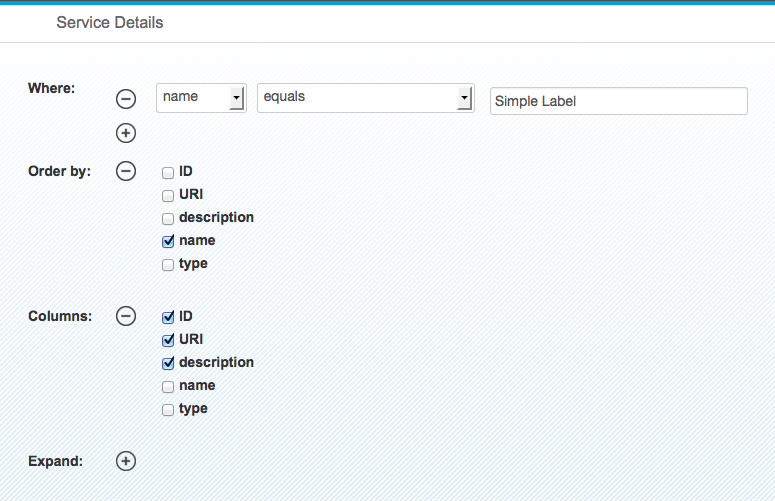
Some selectable options:

Generated Query: read more

Gartner Hype Cycles

Being a technology and innovation evangelist the Gartner hype cycles have exposed and introduced me to variety of new technologies which I was not aware of.

Trigger – announcement
Peak – talks and discussion
Disillusionment – people realize its not available now
Slope – Technology/innovation supports it

Open Source: Node.js dashboard for SAP HANA

This is what we will be developing in this blog ….

Over the past few years Node.js has really caught my attention. The simplicity of Javascript with server side processing, Non-blocking-IO, Event Driven, and simple integration always intrigued me as a great combination for enterprise applications. (Somehow it sounds similar to HANA XS Engine 😉 )

A couple months ago I ran into a similar problem to Jon-Paul Boyd (HANA Forum Post) in which I wanted to use XS Engine for websocket/persistant connections to my HANA Instance, but due to the support not being included in SPS6, I decided to look elsewhere, and ended up using Node.js to fulfill this requirement.

In the past, while developing HANA/Node apps, I resorted to creating a XSJS App which really just acted as a middleware layer to push and pull data from my HANA DB, until recently I noticed a great blog post from Ingo Sauerzapf which piqued my interest. The blog mentioned that Holger Koser had created a HANA DB Client for Nodemaking life extremely easy to connect to HANA directly from Node. I thought it would be good share the small project I developed using Node.js and this new client with the community in the hopes that others will share their experiences with the technology.

This blog is not necessarily an introduction to Node.js development as there are some nice tutorials and examples out there from Tobias Hoffman and Alessandro Spadoni. The blog is intended to cover a small app developed in Node.js and shows the development process behind it, taking it from conception through to reality. I encourage you to download a few of these components, and also the example out. This app, similar to another app I developed called Metric² (which you can read about here), it is a web based widget showing some friendly KPI’s on the performance of your HANA Instance. The app gets streaming data from our HANA backend displaying this in a friendly, simple dashboard. The dashboard is designed to be shown on a large format monitor in a Ops or IT center and can also very easily be modified to show any KPI’s relevant to your business or needs.

Requirements:

SAP HANA Instance (e.g. AWS Developer Image)

Node.js installed (this does not need to be on the HANA box but same network with access to the HANA port – normally 30015).

Node Dependencies

We will also use a couple of helpful dependencies from the node community including Socket.ioExpress and obviously hdb. Installing these packages is as simple as running “npm install hdb”. Once you have the dependencies installed we can start creating our app.

https://paulaschmann.com/wp-content/uploads/2023/10/hdb.png

App Design

For me, I always start mocking up in my favorite Image IDE (Photoshop), I used this image as inspiration for my app. I liked the simplicity, clean layout with focus on the numbers at the bottom. In our case, we will add a small chart in the center, giving us a basic visual representation of the numbers being displayed:

PhotoshopHTML Mockup
Download the PSD

App Development

Index.html

In this case I decided to use Twitter Bootstrap to help with some of the layout/formatting of the page as well as some mundane tasks like Modal popups. From a coding perspective I started out developing the Single paged “index.html” file, doing my best to stick with my mockup which I previously created. I was sure to “id” all of my elements on this page as we will be updating these values from our node.js backend. This aspect of node development is strictly “traditional” web based development. No need to work with Node or any server for that matter. Once you have your page rendering the way you want, we can move on.

<html> <head> <meta http-equiv="X-UA-Compatible" content="IE=edge" /> <meta charset="UTF-8"/> <meta name="viewport" content="width=device-width, maximum-scale=1.0" /> <title>Metric²</title> <!-- jQuery --> <script src="https://code.jquery.com/jquery.js"></script> <!-- Socket.IO --> <script src='/socket.io/socket.io.js'></script> <!-- Peity - a lightweight sparkline package for jQuery --> <script src='js/jquery.peity.min.js'></script> <!-- Client side code needed --> <script src='js/client.js'></script> <!-- Bootstrap CSS --> <link rel="stylesheet" href="//netdna.bootstrapcdn.com/bootstrap/3.0.2/css/bootstrap.min.css"> <!-- Latest compiled and minified JavaScript --> <script src="//netdna.bootstrapcdn.com/bootstrap/3.0.2/js/bootstrap.min.js"></script> <!-- CSS --> <link rel="stylesheet" href="css/style.css"> </head> <body> <div id="top" class="background"> <div class="centercontainer"> <div class="container shadow"> <div class="containerheader"> <table class="heading"> <tr> <td rowspan="2" style="text-align: center; width: 10%;" > <img id="statusicon" src="img/OKIcon.png"/> </td> <td style="vertical-align: top;"> <h1><span id="info-name">SAP HANA Instance</span> <button class="btn btn-link" data-toggle="modal" data-target="#myModal"> <span class="glyphicon glyphicon-cog settingsicon"></span> </button> </h1> </td> </tr> <tr> <td class="h3" style="padding-top: 20px;"> <span class="glyphicon glyphicon-flag icon" style="margin-left: 0px;" /></span><span id="info-alerts">0</span> Alerts <span class="glyphicon glyphicon-repeat icon"></span><span id="info-version">1.0</span> <span class="glyphicon glyphicon-map-marker icon"></span><span id="info-detail">Server Location</span> </td> </tr> </table> </div> <div class="containerbody"> <span class="history">0</span> </div> <div class="containerfooter"> <table class="info"> <tr> <td id="infoUSERS" class="td-info" onClick="setChart('USERS');"> <!-- The ID of each of our <SPAN> tags is important for updating the data being returned from the server --> <span id="info-users" class="h1">0</span><br /> <span class="h3">Users</span> </td> <td class="td-info"> </td> <td id="infoDISK" class="td-info" onClick="setChart('DISK');"> <span id="info-disk" class="h1">0</span> <sup>GB</sup><br /> <span class="h3">Free Disk</span> </td> <td id="infoMEM" class="td-info" onClick="setChart('MEM');"> <span id="info-mem" class="h1">0</span> <sup>GB</sup><br /> <span class="h3">Free Memory</span> </td> <td id="infoCPU" class="td-info selected" onClick="setChart('CPU');"> <span id="info-cpu" class="h1">0</span> <sup>%</sup><br /> <span class="h3">CPU</span> </td> </tr> </table> </div> <!-- /.containerfooter --> </div> <!-- /.container --> </div> <!-- /.centercontainer --> </div> <!-- /.top --> <!-- Modal --> <div class="modal fade" id="myModal" tabindex="-1" role="dialog" aria-labelledby="myModalLabel" aria-hidden="true"> <div class="modal-dialog"> <div class="modal-content"> <div class="modal-header"> <button type="button" class="close" data-dismiss="modal" aria-hidden="true">&times;</button> <h4 class="modal-title" id="myModalLabel">Settings</h4> </div> <div class="modal-body"> <form id="modalbox" role="form"> <div class="form-group"> <label for="servername">Name</label> <input type="text" class="form-control" id="servername" placeholder="Enter a reference server name"> </div> <div class="form-group"> <label for="serverdetail">Location</label> <input type="text" class="form-control" id="serverdetail" placeholder="Description, Location or Other Information"> </div> <div class="form-group"> <label for="bg">Background</label><br /> <label class="radio-inline"> <input type="radio" name="bg" value="../img/bg1.jpg" checked> Background 1 </label> <label class="radio-inline"> <input type="radio" name="bg" value="../img/bg2.jpg"> Background 2 </label> <label class="radio-inline"> <input type="radio" name="bg" value="../img/bg3.jpg"> Background 3 </label> <label class="radio-inline"> <input type="radio" name="bg" value="none;"> None </label> </div> <div class="form-group"> <label for="colorscheme">Color Scheme</label><br /> <label class="radio-inline"> <input type="radio" name="colorscheme" value="Dark" checked> Dark </label> <label class="radio-inline"> <input type="radio" name="colorscheme" value="Light"> Light </label> <label class="radio-inline"> <input type="radio" name="colorscheme" value="Fiori"> Fiori </label> </div> <div class="modal-footer"> <button type="button" class="btn btn-default" data-dismiss="modal">Close</button> <button type="button" class="btn btn-primary" id="modalSave" onClick="saveSettings();">Save changes</button> </div> </div><!-- /.modal-content --> </div><!-- /.modal-dialog --> </div><!-- /.modal --> </body> </html> read more