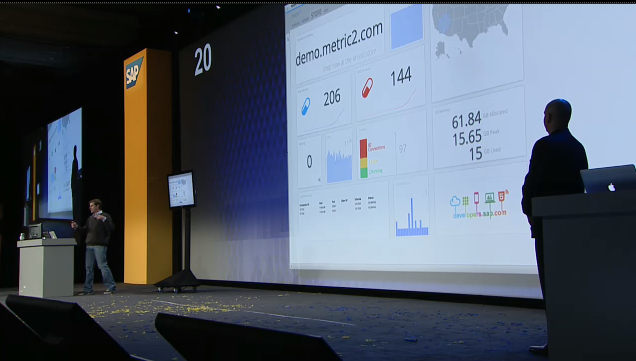
Preparing for SAP Demo Jam at TechEd in Las Vegas was a huge undertaking, I completely underestimated the time and commitment it takes to prep a simple 5 minute demo on the stage in front of 5,000 people. Attached are my notes and details of some of the script around the project and what I was using as a guide.
The store pills should be bigger and center of the screen for everyone to see?
2 Weeks ago I was getting for ready for TechEd Demojam and since my demo was going to involve the audience actually using the a website being served up by the XS engine, I started having some concerns about how much load it could handle. I spent some time digging through the documentation as well as reaching out to guys like Thomas Jung for any advice I could get. As always, it was an interesting experiment and thought it would be great to share some of the experiences I had, and hopefully you can share some ideas or feedback from your point of view.
So, just add some context – the website the audience was going to interact with at Demojam was extremely simple, a single page, 2 buttons, when a user clicked on one of the buttons, I was making a call to a XSJS file, doing a table insert and returning a confirmation, (and in the demo some counts). Pretty simple and straight forward.read more
HANA Talk is a small Javascript class which help facilitate the communication between your front end html/js files and HANA database when using SAP HANA XS Engine. This is intended to help people who are just starting out development on XS Engine and would like a easy place to get their feet wet without having to go through too much trial and error. This is also a great starting point for people involved in events like InnoJam, Hackathons, etc. when POC’s and demos need to developed quickly, but not necessarily perfectly *cough* or securely *cough* 🙂
By providing this tutorial and the HANA Talk download, my hope is that it will encourage more people to consider using XS Engine as a app platform to drive their front end web apps and subsequently, encourage the use and innovation around HANA in general. Anne Hardy had a comment in her blog post regarding the Developer Advisory Board which was along the lines of “Developers want to get it in 5mins max; they want to build real stuff in less than an hour”.
I frequently get discouraged by the amount of learning and effort always needed to learn new technologies and products which companies “get into bed with”. Nearly every one of the apps I develop start out in a POC type phase, where my imagination and reality clash and inevitably produce the equivalent of a 3yr old’s self portrait, often resembling “Unconventional”. While going through these exercises I often wish it was simple to get somethings done, and understanding the cost and willing to accept the trade offs. This is why I developed HANA Talk – to make those unconventional portraits, easier to deliver 🙂
OK – so what does it do?
By adding a HANA Talk js and xsjs file to your project, you can simply write SQL statements in your HTML file and have the results returned synchronously.
e.g. Index.html
<script type="text/javascript">
var resp = hana.executeScalar('SELECT 1 FROM DUMMY');
console.log(resp); //Outputs 1
</script>
Super simple and easy. See below for further details.
Prerequisites
1. Download/fork these 2 files – client.js & server.xsjs from Github and add them to your package. The filenames/structure can be changed if you are feeling adventurous. In your HTML file, you will need to reference client.js, this is as simple as adding a tag to you header. For reference, if you are not using SAP UI5 or jQuery – you will need to add this to your HTML header as well.
A Basic Example
2. In your javascript code, instantiate a new HanaTalk object. We will use this to “pass” our SQL commands to our HANA DB.
var hana = new HanaTalk('SYS'); //The 'SYS' reference is in relation to the Schema. It can be specified here or within your TSQL Statement
3. Call your HanaTalk object with the operation type and SQL you would like execute (see below for additional operations).
var result = hana.executeRecordSet("SELECT 1 FROM DUMMY");
4. We can populate that response into our html (DOM)
a.) Insert/Update/Delete a record – use .executeChange, this will execute your code and respond with the records which have been updated
document.getElementById("resp4").innerHTML = /*hana.executeChange("UPDATE/INSERT/DELETE .... ") + */ ' Record Changed';
b.) Return a Table – using .executeRecordSet will return a html formatted table, displaying the select’s record set
document.getElementById("resp2").innerHTML = hana.executeRecordSet("SELECT TOP 5 * FROM M_HOST_INFORMATION");
c.) Return a Object – .executeRecordSetObj allows us to loop through records, and have quite a lot of control of the display of each record and its column name.
document.getElementById("resp3").innerHTML = hana.executeRecordSetObj("SELECT TOP 5 * FROM M_HOST_INFORMATION");read more
For me (and I am sure many others!), UI5 has become a really useful toolkit for easily developing web apps and POC’s with little effort around the SAP Ecosystem. The OData support, rich controls and business inspired examples lend itself well to the mantra of “Don’t reinvent the wheel”. At a recent SAP Inside Track event in NY, I made reference to the fact, that while developing a mobile app, I, or a graphic designer, can spend close to 40% of the total design & development phase/hours on the UI. Building “consumer grade” enterprise apps is a different way of thinking for app developers. I am sure many of you, like me, started out with a redefined canvas of boring, grey .NET controls or a “Enjoy” SAP CXTAB_CONTROL. But times are changing and we should all look to the creative and vibrant consumer world of both web and mobile apps to reconsider our methods and processes for developing great apps.read more
Paul Aschmann pictured above, made Gateway on mobile sound easy. His slides contain resources and a life cycle of how to do a Gateway mobile project. He showed us an application from a manufacturing side and how he gathers requirements, design, and handles development. A good discussion ensued about native mobile application development.
On saturday I published a blog about a small app I wrote called xSync – basically a XS Engine app for Mac developers where you can sync a local development folder with your HANA repository. This is for rapid development and to encourage the “bring your own IDE” approach to application development on HANA. Here is a look behind the scenes on how the app works and some of the challenges of the project.
As mentioned in my previous blog – I started using the IDE Lightweight editor after doing the upgrade of my AWS HANA box last weekend. I enjoyed the experience but after working with it for nearly a full day was wanting a little more. Syntax highlighting, easy commenting, easy indentation, CSS autocomplete and hints, etc. etc. so I started doing some peaking around the editor itself and came to find the editor is something called ACE, a pretty nice little open source IDE (written in JS). This got me thinking … maybe I could insert text directly into the Lightweight IDE browser text box, and submit the form as a save …. hmmm …. not a terrible idea …. just need to scrape the page, find the elements and submit the form via some injected JS. Pretty simple … I did some digging and found the HTML objects I needed by using Firebug when a lightbulb went off … instead of populating the form via a HTML page, why not rather check the HTTP methods it is calling when doing the actual save, since there must be some integration with HANA directly … which is when I came across the mother load … a small file called reposervice.xsjs 🙂 It seemed that every time I was saving or modifying my objects through the IDE, it was calling this file. After checking out the parameters it was `, it was very clear that the methods and text were easy to simulate. I fired up REST Client and within a couple minutes the concept was POC’ed. Pass your file contents as your body with a path param and a POST and you were off to the races 🙂
Using Firefox Rest Client to monitor system calls showed each save, create, delete operation was using a small file called reposervice.xsjs, which references the libraries needed for the repository modifications.read more





You must be logged in to post a comment.